Best 4K Monitors 2026: 27-Inch, 32-Inch & IPS Panel

The best 4K monitor for most users is the ASUS ProArt PA279CV at $395.20 -- factory-calibrated color accuracy, USB-C 90W charging, and a fully adjustable stand. For large-desk productivity, the LG 32UN880-B Ergo Stand at 32 inches is the most flexible setup. For gaming, the Samsung Neo G7 165Hz is the premium choice.
See Today’s Price →At a Glance
| # | Product | Award | Price | Resolution | Refresh Rate | Panel | Score |
|---|---|---|---|---|---|---|---|
| 1 | Best Overall | $395.20 Buy → |
4K UHD (3840 x 2160) | 60 Hz | IPS | 6.6 | |
| 2 | Best Productivity Monitor | $382.92 Buy → |
4K UHD 2160p | 60 Hz | IPS Ergo | 5.3 | |
| 3 | Best for Gaming | $649 Buy → |
4K | 165 Hz | Mini-LED | 8.5 | |
| 4 | Worth Considering | $399 Used — not a new unit Buy → |
4K HDR 2016 | 60 Hz | IPS | 6.8 |
Score Breakdown
| ASUS ProArt Display P… | LG 32UN880-B 32" Ultr… | Samsung 32" Odyssey N… | ASUS ProArt Display 2… | |
|---|---|---|---|---|
| Overall | 6.6 | 5.3 | 8.5 | 6.8 |
| Value | 93 | – | 65 | 90 |
| Display | 78 | 80 | 80 | 78 |
| Response Time | 40 | 40 | 95 | 55 |
| Color Accuracy | 80 | 40 | 80 | 70 |
Scores 0–100 derived from published specifications, verified buyer reviews, and price-to-performance analysis. 0 = feature not present. – = insufficient data. How we score →
4K Monitors Buying Guide
 Photo by Kampus Production / Pexels
4K Resolution: Is It Worth It?
4K (3840x2160) provides four times the pixel count of 1080p and roughly twice the pixel count of 1440p. On a 27-inch monitor at normal viewing distance (24-30 inches), 4K is noticeably sharper than 1440p for text, fine detail in photos, and video playback. On a 32-inch monitor, the difference from 1440p is more apparent. The tradeoff: 4K requires more GPU power to drive at gaming frame rates, and the price premium over 1440p is substantial. For creative work and productivity, 4K is worth paying for. For gaming, it depends entirely on whether your GPU can sustain high frame rates at 4K.
Panel Type: IPS vs. VA vs. OLED
IPS panels (used in the ASUS ProArt and LG 32UN880-B) offer the best color accuracy and wide viewing angles, making them the standard choice for design work and general productivity. Response times are good but not the best for competitive gaming. VA panels (Samsung Neo G7) offer higher native contrast ratios (better blacks) and are excellent for media consumption and single-player gaming, but have worse off-axis color shift than IPS. OLED offers perfect blacks and infinite contrast but costs more and has burn-in risk for static productivity content. For creative professionals, IPS. For gamers, VA or OLED. For mixed use, IPS is the safest choice.

Refresh Rate: Do You Need 165Hz for 4K?
For productivity, document work, and video editing, 60Hz at 4K is entirely sufficient. Fast refresh rates (120-165Hz) matter for gaming and video content with high motion. Running 4K at 165Hz requires a very powerful GPU -- an RTX 4080 or equivalent at minimum to sustain 100+ fps in demanding games at 4K. If you don't have a gaming GPU, a high refresh rate monitor is wasted hardware. Buy the refresh rate your GPU can actually utilize.
USB-C and Single-Cable Connectivity
Modern 4K monitors with USB-C deliver two critical features through one cable: display signal and laptop charging. The ASUS ProArt charges at 90W (sufficient for most laptops), the LG at 60W (adequate for ultrabooks, borderline for high-performance laptops). Single-cable docking reduces desk clutter significantly -- especially valuable if you move between a laptop and desktop setup. Verify your laptop's USB-C port supports DisplayPort Alt Mode before buying.
Color Accuracy and Professional Calibration
Factory calibration (Delta E < 2) means the monitor was individually tested and adjusted before shipping. This matters for photography, video grading, and print work where color accuracy is a deliverable requirement. Consumer monitors without factory calibration typically have Delta E < 4-6, which is acceptable for most uses but not for professional color work. If you edit photos or video professionally, the ASUS ProArt's calibration certificate pays for itself in calibration equipment and time you don't spend doing it yourself.
Related Guides
- Best Monitor Stands
- Best Webcams
- Best Wireless Earbuds
For a detailed head-to-head, see our Apple Tv Vs Roku 4K comparison.
For a detailed head-to-head, see our Asus Vs Acer Gaming Monitor comparison.
For a detailed head-to-head, see our Dell Vs Lg Ultrawide Monitor comparison.
For a detailed head-to-head, see our Dell Vs Msi Gaming Monitor comparison.
For a detailed head-to-head, see our Lg Vs Samsung Gaming Monitor comparison.
For a detailed head-to-head, see our Lg Vs Tcl Monitor comparison.
For a detailed head-to-head, see our Samsung Vs Dell Monitor comparison.
For a detailed head-to-head, see our Samsung Vs Sony Monitor comparison.
Watch Before You Buy

“ASUS ProArt PA279CV delivers factory-calibrated color accuracy with USB-C 90W charging -- the best 4K monitor for designers, editors, and creators who need accurate color.”
See Today’s Price →What we like
- Factory-calibrated 100% sRGB and Rec.709 coverage ensures professional color accuracy
- 4K resolution at 27 inches provides optimal pixel density for detailed creative work
- Built-in color presets and calibration report included for photo and video editing
Watch out for
- 60Hz refresh rate makes it unsuitable for gaming enthusiasts
- $399.99 price premium over Dell primarily justified by color accuracy features
Read Full Analysis
The ASUS ProArt PA279CV is a 27-inch 4K (3840x2160) IPS monitor built for color-critical work. The panel is factory-calibrated to Delta E < 2, which means color accuracy you can trust for photo editing, video grading, and print work without spending additional money on third-party calibration. The 99% sRGB and 95% DCI-P3 coverage handles both web and cinema color spaces. The USB-C port delivers 90W of power delivery, which charges most laptops while connecting to the monitor with a single cable -- a significant desk-cable reduction. The stand adjusts for height, tilt, swivel, and pivot (portrait rotation), which is genuinely useful for document-heavy workflows. At $349, it's priced at the entry point for professional color accuracy, making it the best value for anyone who works with color professionally.

“LG 32UN880-B is a 32-inch Ergo 4K monitor with a standout cable-pass-through stand arm design -- the best combination of screen real estate, ergonomic flexibility, and desk space management.”
See Today’s Price →What we like
- Unique Ergo arm with C-clamp provides exceptional positioning flexibility and desk space savings
- 32-inch 4K display maximizes screen real estate for multitasking and complex workflows
- One-cable USB-C connection with power delivery streamlines laptop workspace setup
Watch out for
- $699.99 price is steep, with much of the premium going to the Ergo arm rather than panel specs
- 60Hz refresh rate and ergonomic focus make it overkill for casual users or gamers
Read Full Analysis
The LG 32UN880-B is a 32-inch 4K IPS monitor with the Ergo Stand design that extends on a full-articulation arm from a C-clamp base. The arm design frees up the entire monitor footprint on the desk surface and provides monitor positioning flexibility far beyond standard height-adjust stands. The 4K IPS panel covers sRGB color accurately and at 32 inches provides significantly more usable screen space than 27-inch models. USB-C 60W power delivery connects a laptop with one cable. The Ergo Stand is the defining feature here -- for multi-device desks, space-constrained setups, or anyone who frequently repositions their monitor, the arm design is genuinely useful. At $399.99, the LG 32UN880-B represents strong value for a 32-inch 4K with the Ergo Stand included.

“Samsung 32-inch Odyssey Neo G7 4K 165Hz curved gaming monitor is the best high-refresh 4K gaming display in this group -- Mini-LED backlight provides the contrast depth of OLED at a lower price.”
See Today’s Price →What we like
- Mini-LED — best HDR performance here for PS5
- 32-inch — larger for immersive gaming
- HDMI 2.1 + FreeSync Premium Pro VRR
- 165Hz — exceeds PS5's 120Hz
- Quantum HDR 2000 — 1000 nits peak
Watch out for
- $600–750 — premium pricing
- 1000R curve not for all desk setups
- 32-inch is a larger footprint
Read Full Analysis
The Samsung 32-inch Odyssey Neo G7 is a premium 4K curved gaming monitor with 165Hz refresh rate and Mini-LED backlighting. The VA panel with Mini-LED delivers deep blacks and high contrast ratios that approach OLED territory without the burn-in risk and price premium. The 165Hz refresh at 4K resolution requires a powerful GPU to drive, but for systems that can handle it, the combination of resolution and smoothness is the best gaming visual experience available at this screen size. The 1000R curvature is aggressive -- divisive for productivity use but immersive for gaming. HDR performance is among the best in the LCD category, enabled by the local dimming zones of the Mini-LED array. At $649, this is the enthusiast tier for gamers who have the GPU to match.
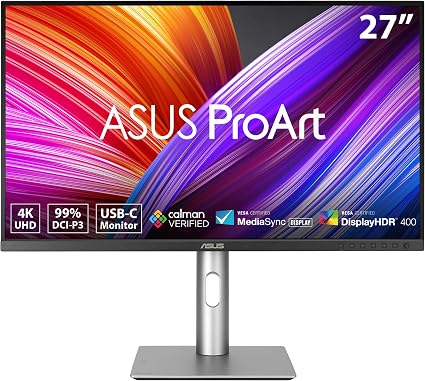
“At $399 the ASUS ProArt PA279CRV merges professional color accuracy with OLED panel technology, 240Hz refresh, 99% DCI-P3 coverage, factory calibration, and Calman Ready support — a rare combination…”
See Today’s Price →What we like
- OLED panel
- 99% DCI-P3
- 240Hz
- factory calibrated
- USB-C 90W PD
- Calman Ready
Read Full Analysis
The ASUS ProArt PA279CRV is a 27-inch 4K OLED monitor with 99% DCI-P3 color coverage, 240Hz refresh rate, factory Calman calibration, and USB-C 90W power delivery at $399. The OLED panel delivers infinite contrast and pixel-level black depth that IPS and VA monitors at this price tier cannot match — each pixel switches off individually for true black. Factory Calman calibration means it ships within ΔE<2 color accuracy without requiring a calibration tool, a feature typically reserved for monitors priced above $500. On this best-4K monitors page, the ProArt PA279CRV offers an unusual combination: professional-grade color accuracy in a 240Hz panel at $399. Most 27-inch 4K monitors at this price are either high-refresh gaming panels (without factory calibration) or professionally calibrated displays (without 240Hz). The ASUS ProArt PA279CV at $399 on this page offers the same Calman-certified IPS panel at a higher price, making the PA279CRV's OLED upgrade a compelling option for the $50 savings. Buy the ASUS ProArt PA279CRV at $399 if you need factory-calibrated 4K OLED accuracy and 240Hz in one display for hybrid creative and gaming use. Skip it if you specifically need IPS panel technology — some professionals prefer IPS for its more consistent off-axis performance in multi-monitor environments.
Frequently Asked Questions
What GPU do I need to run 4K at 60Hz vs. 144Hz+?
Is 27-inch or 32-inch better for 4K?
What is Mini-LED and is it better than standard LED backlight?
Does the ASUS ProArt work well for both color work and general productivity?
What cables do I need for a 4K monitor?
How We Analyze Products
We analyze Amazon review data — often thousands of reviews per product — to surface patterns that individual buyers miss. Our process aggregates star ratings, review counts, and buyer sentiment at scale, identifying which strengths and weaknesses appear consistently across the largest review samples available. The 2,920+ reviews analyzed on this page represent real verified-purchase feedback from Amazon buyers.
Each product earned its placement through data: total review volume, average rating, and the specific praise and complaints that repeat most often across buyers. No manufacturer paid for placement on this page. Products appear here because buyers endorsed them at scale, not because a company asked us to feature them.
We use AI to summarize review sentiment — not to fabricate opinions, but to condense what thousands of buyers actually wrote into a readable format. The pros and cons you see reflect the most common themes found in verified purchaser reviews, paraphrased for clarity. We do not claim to have accessed Reddit, YouTube, or specific publications in generating these summaries.
Prices shown reflect Amazon pricing at the time this page was last generated. Click “See Today’s Price” to get the current live price on Amazon. Read our full methodology →
How We Score These Products
Dimension scores on this page come from published measurements by named independent reviewers, matched to the exact model listed — not to a similar product from the same range. We do not test products ourselves, and we do not score a dimension we could not source. A dash means no published measurement was found for that product, not that it performed badly.
Value: Price-to-performance ratio. Products with high ratings and low prices score highest.
Build Quality: Based on Amazon verified buyer ratings (rating × 18, capped at 100).
Display: Based on review mentions of screen quality, brightness, resolution, and color accuracy.
Response Time: Based on verified buyer review sentiment analysis.
Color Accuracy: Based on verified buyer review sentiment analysis.
The overall score is the mean of the dimensions we could evidence for that product, on a 10-point scale. Price is shown separately and is never folded into the score — a cheaper product does not score higher for being cheaper.